
SMART 2.0 — Sign in & navigation
Sign in at https://thesmartbuilder.net with your Smith Douglas credentials (same as SMART 1.0). After login, you usually land on default.aspx or a module hub (sales/default.aspx, etc.). Some environments expose Dashboard.aspx; if that page errors, open your module from the left menu instead. Navigation comes from SMART2.Master — menus depend on your roles and web app permissions.
Sign in step by step
Section titled “Sign in step by step”- Open https://thesmartbuilder.net in Chrome or Edge (latest version).
- Enter username and password (Smith Douglas Active Directory for internal users).
- If your account uses an external domain, follow the external-user path on the login page.
- On success you land on
default.aspxor your ReturnUrl (bookmark deep links after login). - Some environments ask you to pick company / database context — choose your division.
Password reset: ResetPassword.aspx or your division IT ticket — never share accounts.
After login — where to go
Section titled “After login — where to go”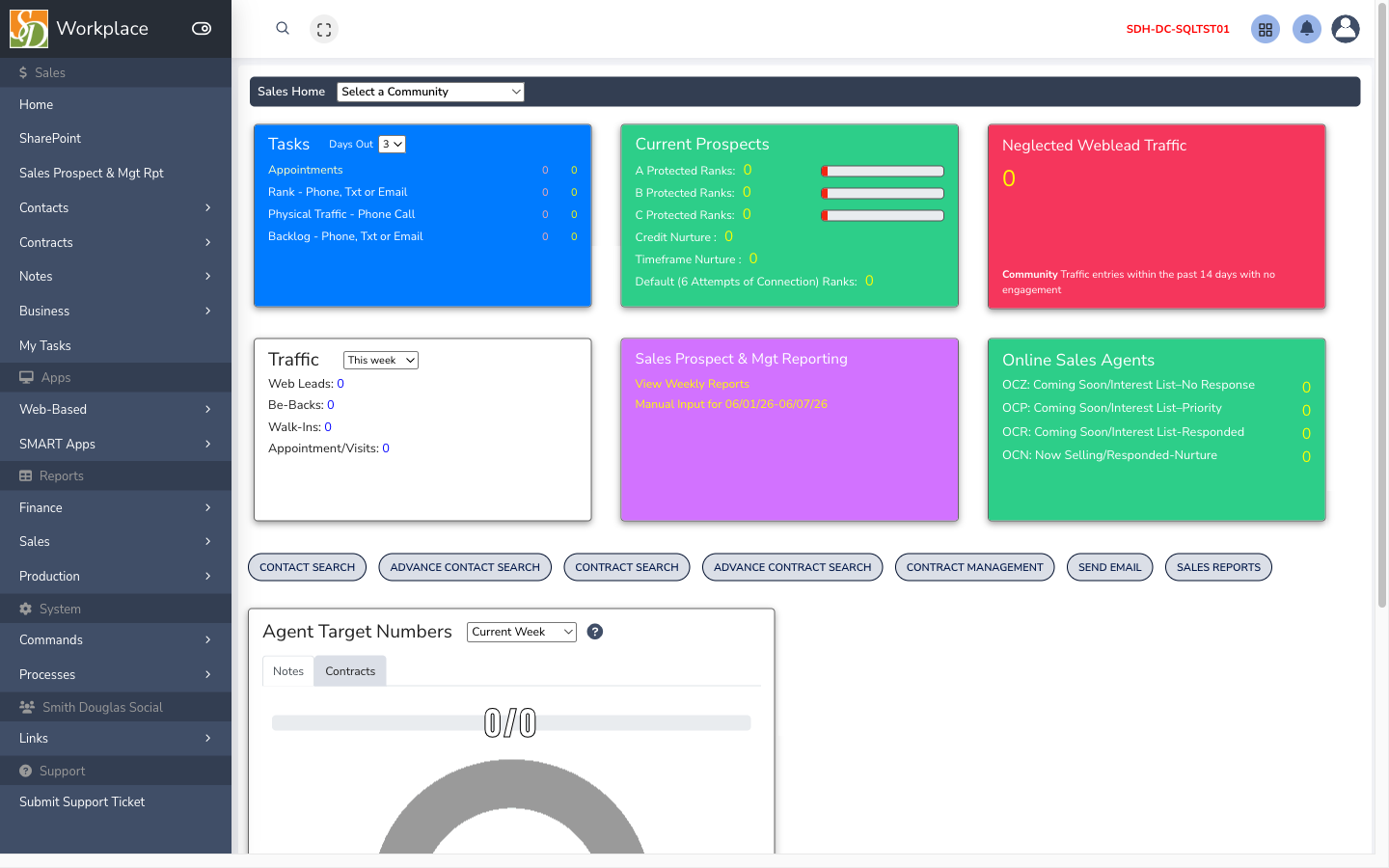
| Destination | URL (typical) | Use when |
|---|---|---|
| Portal home | /default.aspx | General entry after login |
| Sales home | /sales/default.aspx | Sales KPIs and tasks (shown above) |
| Dashboard | Dashboard.aspx | Division tiles — may not work on all servers |
| Production hub | /production/default.aspx | Production tools and reports |
| Accounting hub | /accounting/default.aspx | Finance links and reports |
| Process inbox | process-dashboard.aspx | AgilePoint tasks waiting on you |
| User settings | /user/ | Profile preferences |
Bookmark the hubs you use daily — the full menu can be long.
Navigation and layout
Section titled “Navigation and layout”SMART2.Masterwraps authenticated pages (header, module menu, launch desktop SMART).- Desktop SMART apps — many hubs show “SMART Sales”, “SMART Production”, etc. These open the WinForms client via
openSMARTapp()when installed. - Web-only tiles — contracts, imports, land acquisition, reports — stay in the browser.
- Current module — URL folder (
/sales/,/production/) sets context for reports and permissions.
Permissions (why a page is missing)
Section titled “Permissions (why a page is missing)”SMART 2.0 checks two layers:
- Logged in —
Session["Database"]must be set; otherwise redirect tologin.aspx. - Web app allowed —
Session["WEB_APPS_MENU"]must include the app name (e.g.Sales,Production); otherwiseprivs.aspx(“Insufficient Privileges”).
Desktop SMART module rights come from AuthorizedApplications — you can have desktop Sales without web Sales, or the reverse. Admins fix this in Administration.
AgilePoint from email
Section titled “AgilePoint from email”Approval emails link to FormRender.aspx, ProcessViewer.aspx, or related URLs. You may need to log in first; the link should return you to the form. See AgilePoint & approvals.
Browser and session tips
Section titled “Browser and session tips”- Allow pop-ups for thesmartbuilder.net (process windows).
- Refresh after someone else changes a lot in desktop SMART.
- Log out on shared PCs (
logout.aspx). - Long idle → session timeout → log in again (unsaved form data may be lost).
Troubleshooting
Section titled “Troubleshooting”| Problem | What to try |
|---|---|
“Access denied” / privs.aspx | Request web app + role from admin |
| Blank page after login | Clear cache; InPrivate window; verify URL |
| Module missing entirely | Division may not use web for that area — SMART 1.0 |
| Dashboard empty | No tiles assigned — admin / division config |
| Process link does nothing | Pop-up blocker; re-login |
| Data looks wrong | Confirm company/database context; refresh |